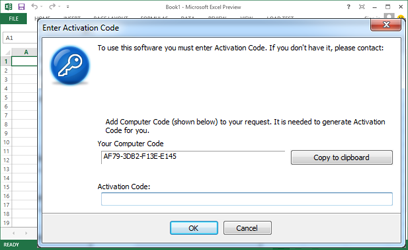
LockXLS adds copy protection features to your Excel workbook. It makes formulas and VBA code
unavailable to your customers, adds various registration options - generates hardware based Computer Code,
creates Activation Code to unlock the workbook on your customer's PC, customizes the messages shown to customers during registration.
The locked workbook may have a trial period and a splash screen. Also it will be converted to an application, which
runs on Excel but has no other external dependencies making it easy to distribute.
There is no need for you to write a code which creates hardware dependent Computer Codes, registration interface and other features
needed for distribution. All of them are provided by LockXLS, you should only select only the needed options in the project and enter your own messages.
We suggest that you review the
How it works page to see how a protected file works on
a customer's PC. The
Examples page contains protected files which you can download and
test on your PC.
Why LockXLS:
LockXLS encrypts all formulas and VBA Code in the Excel document. Your customers can only open this document with
LockXLS Runtime and only if registration checking was successfully passed.
LockXLS Runtime Module blocks access to formulas and VBA code in the locked file. The user cannot
get access to formulas in locked files, because all possible ways are blocked by LockXLS. All
data is encrypted and decrypted on-the-fly and only when it is needed. LockXLS does not
create temporary files from which user can extract information.
All Excel's features are supported in locked file. You need not redesign your file or change macros.
Our primary goal is to make locked files work in same way as usual Excel documents.
LockXLS creates Windows Installer setup package (MSI) for your product. You can add a License Agreement
to this package, create shortcuts to your files on user's desktop and in the Start | All Programs menu. Your
product will look professional and you will not need to purchase an application to create setup packages.
LockXLS has all that you need to deploy your product to customers!
Read
CNet editors' review for LockXLS on the
download.com
What you get using LockXLS:
-
Your spreadsheet is protected with a:
-
Hardware based Activation Code (the workbook is locked to a specific PC)
- As an alternative to locking the workbook to a specific PC,
an Activation Code may be bound to a USB flash drive. This allows you to control how many copied are launched on customer's PCs.
- Serial Number
- Trial period
- Password
- You create a setup package to deploy your product to customers.
-
You can create rental files using LockXLS. The hardware based Activation Code will
unlock the spreadsheet only for a specified period of time.
-
You may limit an evaluation by the number of openings of a protected document.
-
You man also lock linked workbooks. Linked files can be converted to applications or locked Excel documents.
In both cases locked applications work as usual Excel documents.
-
Your locked spreadsheet can be used in Microsoft® Sharepoint®.
-
On-line activation. LockXLS setup includes keygen applications for Linux and Windows, which could be used on your website.
Also you can provide a URL for on-line activation.
-
Spreadsheet can be converted to:
- An application that does not require any additional files for distribution
- A protected Excel document that requires LockXLS Runtime to be installed on customer's PC
-
Formulas and VBA code are unavailable to user. Customer will not be able to view and
analyze the logic of your workbook.
-
Formulas and VBA code are inaccessible through COM Object Model. User cannot
write a VBA code to retrieve your formulas or macros.
-
Protect workbooks from hackers cracking your VBA passwords and sheet passwords.
-
Protect Excel Add-Ins (.xla, .xlam) in same way as other Excel
documents.
-
Disable printing in Excel.
-
Add your own End-User License Agreement with Accept and Decline buttons to the protected file.
-
Add your own Splash screen with your custom image.
-
Add your own Help file to your locked application.
-
Customize the activation messages shown when the user opens a locked workbook.
-
Use your own custom icon to open the applications, created from Microsoft Excel documents.
-
Your customer works with protected files in the same way as with usual Excel
documents.
-
Time synchronization with Internet Time Servers. Customer will be unable to
rollback time and "extend" the evaluation period.
-
Data in the spreadsheet is encrypted with a secure 128-bit algorithm.
-
Data on hidden sheets cannot be accessed from an external application.
-
There are no limitations to the workbooks, which can be protected. All features
of Microsoft Excel are supported by LockXLS.
-
The protected spreadsheet model will be as fast as the original model.
-
LockXLS has a very simple interface and will be easy to use.
See screenshot ...
-
LockXLS is easy to install and uninstall.
If this list of LockXLS features doesn't meet your requirements, please send us your
suggestions using this
form and we
will implement them in our next release!
Localized versions of LockXLS:
LockXLS is available in English and German languages.
Please, visit our German Distributor's website
www.LockXLS.de to get more
information and support for German version of LockXLS.
Download LockXLS now:
You can download a 15-day full featured evaluation version from
this link:
To see version history, please visit our
Download page.
We recommend that you install LockXLS
and review the Help | Getting started topic, where you will find step-by-step instructions on how to create application, which is ready for distribution.
The LockXLS setup package contains sample projects, which can be used to lock Add-Ins or usual Excel document.
Other products for spreadsheet developers:
Dependency Auditor.
|
Analyze and trace dependencies and calculations in workbook, quickly find errors.
This tools allows you to quickly find where the value comes from.
Read more on the Dependency Auditor's website http://www.SpreadsheetTools.com/da.
|
Workbook Comparison Tool.
|
Compare and merge Microsoft Excel workbooks. Workbook Comparison Tool
is quick and easy-to use tool with its own smart algorithm, used to find differences.
|